
AWZ PC Cleaner Review – Is the Relatively New PC Cleanup and Optimization Tool Worth It?
Windows already gives you ways to clear out unwanted files, so paying for a PC cleaner software program needs a good reason. That’s where AWZ PC Cleaner has something to prove. It goes beyond basic junk cleanup with duplicate-file detection, stubborn-app removal, storage management, startup controls, and a collection of Windows tweaks tucked into one program.
I found out that the software can free up drive space by cleaning junk files and removing duplicate files. On its website, it is also mentioned that AWZ can help you get rid of stubborn apps. I put those claims to work on a real PC rather than taking them at face value. Stick around to find out what I learned.
Pros&Cons
Advantages and Disadvantages of AWZ Windows PC Cleaner
What’s New?
AWZ PC Cleaner Version 1.3.2 – What Really Changed?
AWZ PC Cleaner 1.3.2 arrived on May 19, 2026, and it is the first version of hopefully many more to come. The developer company, Chengdu Aishang Office Technology Co., Ltd., claims that it does a decent job of managing background apps and processes, with the goal of cutting down boot time and keeping unnecessary programs from eating up resources.
According to the company, it can go after stubborn applications and clean up files they leave behind instead of simply removing the main program. AWZ PC Cleaner is now compatible with Windows 11, 10, 8.1, 8, and 7. I just hope they roll out versions for other operating systems aside from Windows.
Testing AWZ PC Cleaner
Getting Started with AWZ PC Cleaner
AWZ PC Cleaner keeps most of what you need right in the sidebar, so getting around the program doesn’t take long. I didn’t have to dig through menus to find a particular utility.
Cleanup, file management, Windows tweaks, drive maintenance, and the uninstaller each have their own section, and the names generally tell you what you’re getting into.
For a first run, I’d go with Full Scan. Click Scan Now, and AWZ checks several areas rather than sending you through them one by one.
Deep Cleanup is part of that process, along with checks for duplicate files, large files, and apps that can be moved elsewhere.
This is probably where a new user will spend the first few minutes with the program. You can always head into the individual tools later if something needs a closer look.
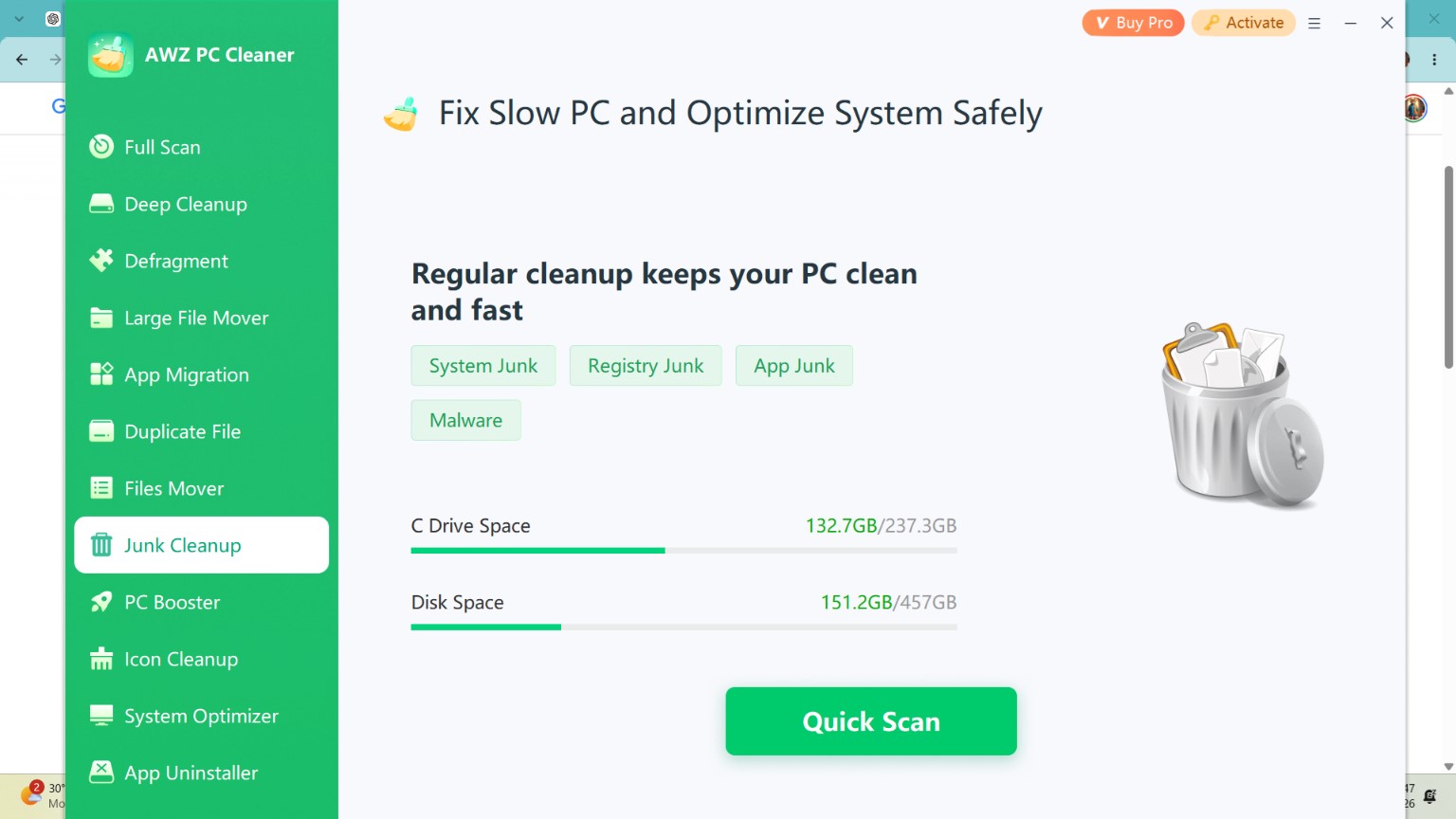
That’s where AWZ gets a little more hands-on. Junk Cleanup deals with leftover system, registry, and app files.
PC Booster is aimed more at startup and general performance, while System Optimizer looks at some of the smaller Window’s annoyances.
On my screen, those included boot problems, missing icons, shortcut arrows, UAC shield icons, and Windows Update settings.
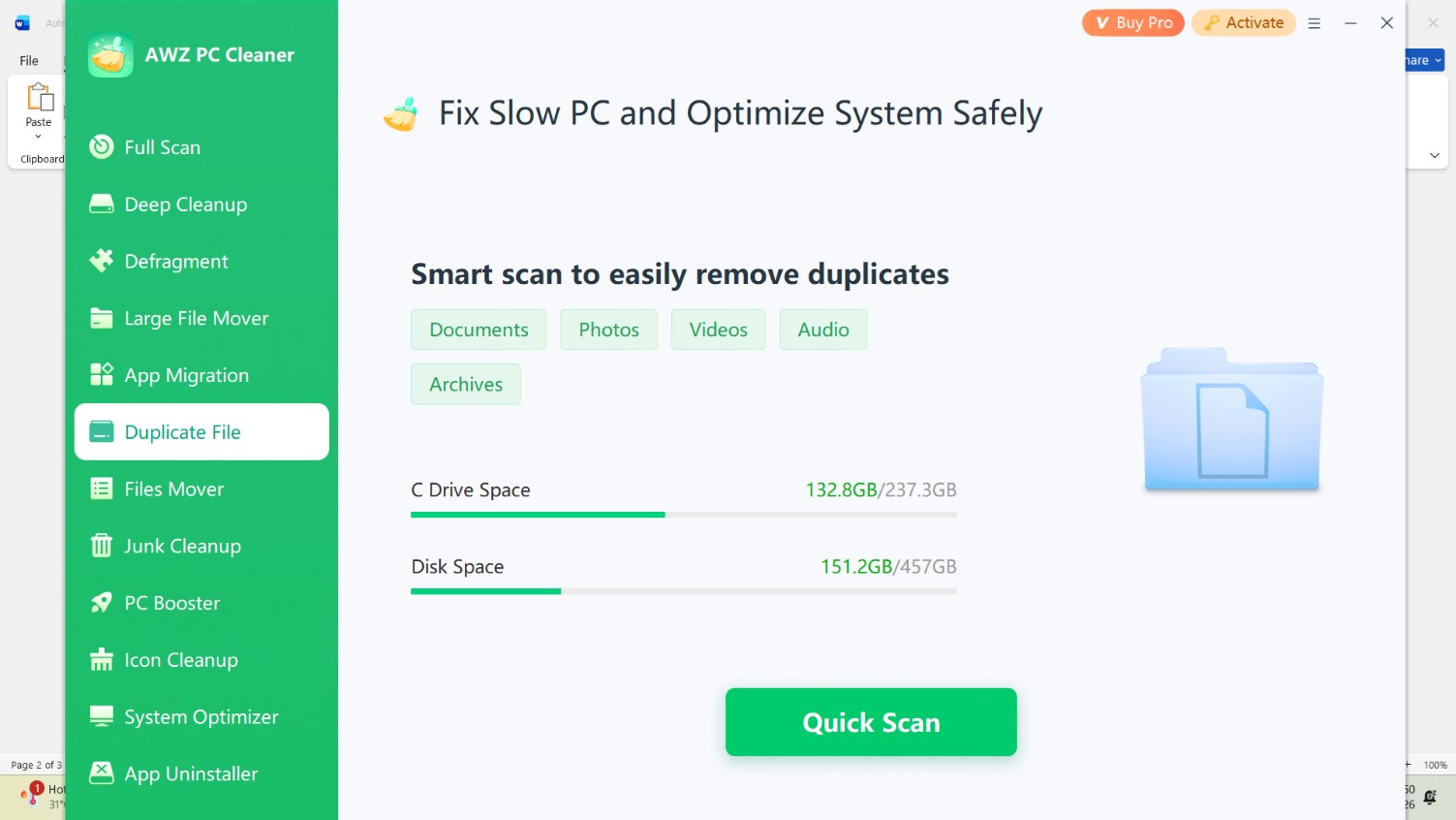
Do not forget to explore the storage tools. You may need them if your drive crammed full. Check for duplicate documents, photos, videos, audio, and archives for copies using the tool.
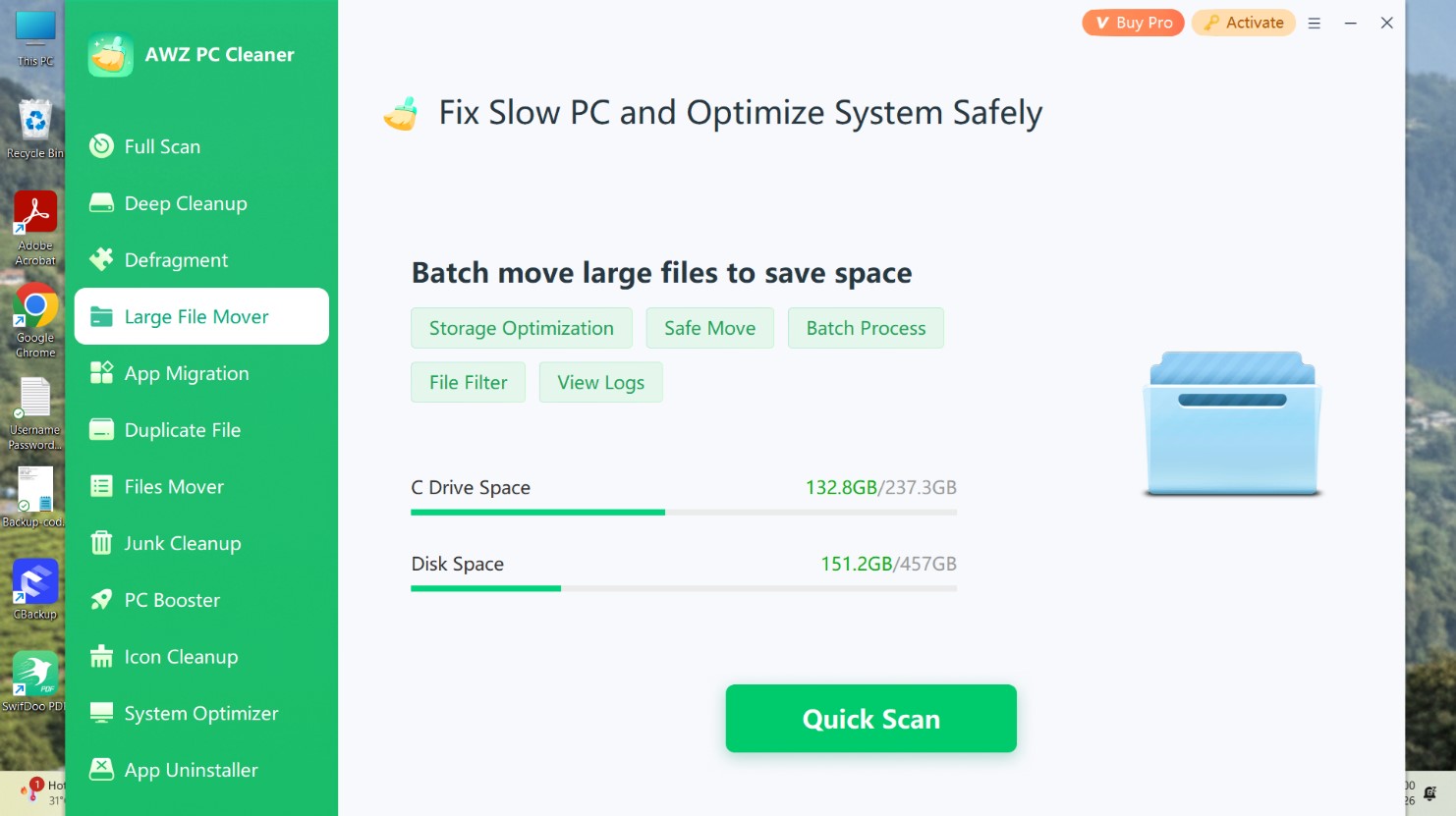
The Large File Mover tool takes a different approach. With it, you can find the space hogs first, then decide what should go somewhere else.
You can filter the results, move files in batches, and pull up a log afterward. There’s also Files Mover for relocating everyday folders such as Downloads, Documents, Pictures, Videos, Audio, and Favorites.
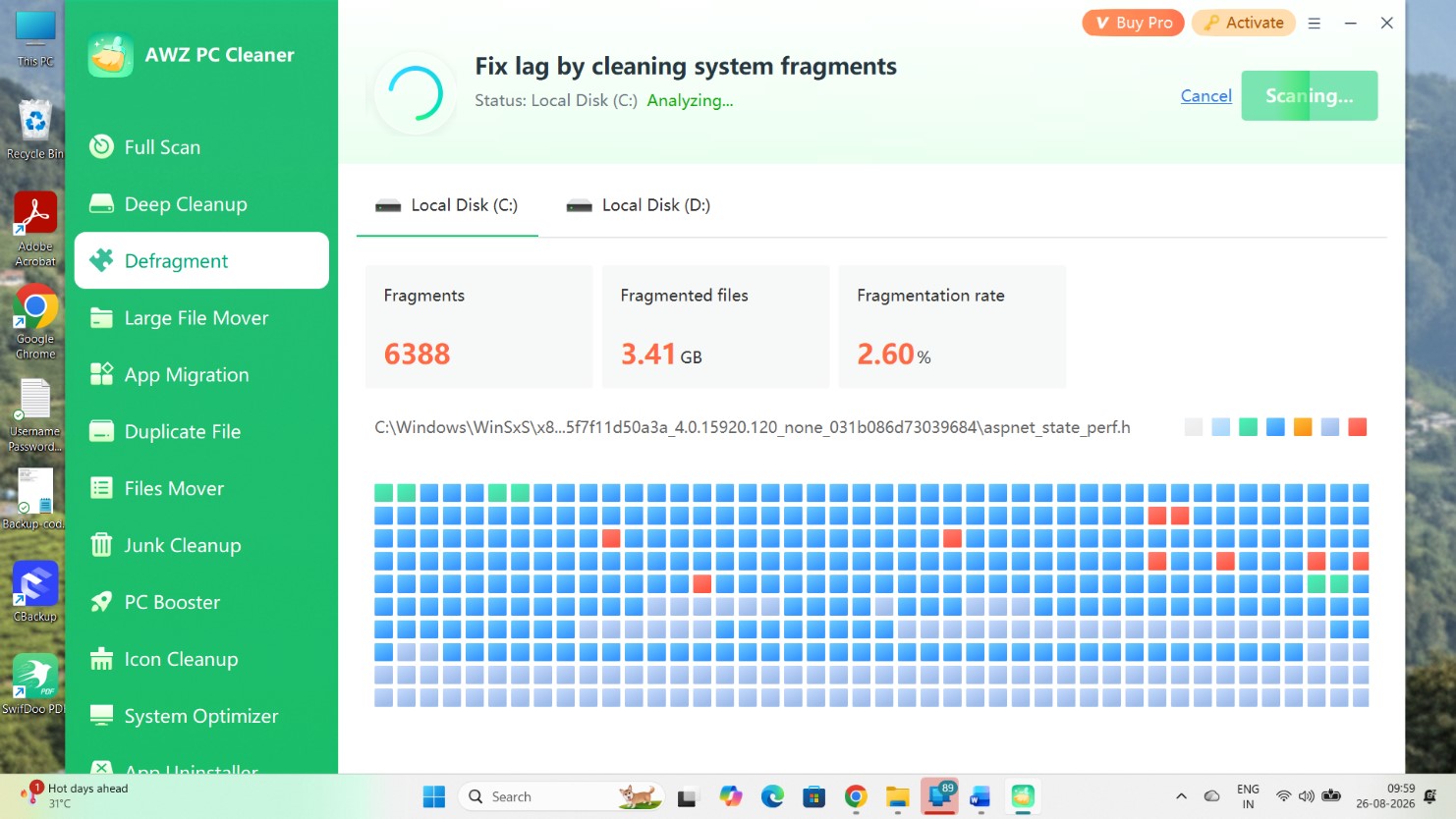
Defragment is more old-school PC maintenance. Pick a drive and let AWZ analyze it. When it’s done, you get a fragment count, the amount of data tied up in fragmented files, and a fragmentation percentage.
The drive map alongside those figures is useful too. I found it easier to make sense of the drive’s condition there than by staring at the numbers alone.
After bouncing between these tools for a while, I found AWZ pretty easy to get around. Most screens don’t ask much of you: choose what you want checked, run the scan, look over the results, and make the call from there.
There are plenty of utilities here, but the program doesn’t bury them under layers of settings. For someone who wants to clean up a Windows PC without turning it into a weekend project, that’s probably AWZ’s biggest strength.
Here’s a broader look on what AWZ PC Cleaner offers and how you can use it to optimize your Windows system.
Features table
What Can You Do with AWZ PC Cleaner?
| Tool or Capability | What You Get |
| Full PC scan |  |
| Junk cleanup | System Junk, Registry Junk, App Junk, and Malware checks |
| Windows optimization | Checks Windows Updates, Boot Issues, Shortcut Arrows, UAC Shield Icons, and Missing Icons |
| PC performance boost | Startup Boost, Speed Up, and System Boost |
| Duplicate detection | Scans Documents, Photos, Videos, Audio, and Archives |
| Large-file management | Storage Optimization, Safe Move, Batch Process, File Filter, and View Logs |
| Personal file moving | Moves Documents, Downloaded Files, Pictures, Videos, Audio, and Favorites |
| App migration | |
| App removal | dedicated App Uninstaller |
| Drive defragmentation | with fragment count, fragmented file size, fragmentation rate, and a visual drive map |
| Desktop icon cleanup | Covers This PC and Sidebar icons |
| Scheduled maintenance |  |
| Real-time monitoring | |
| Internet optimization | No dedicated tool |
| File recovery | |
| License options | 1 month: $9.95 for 1 PC; 1 year: $34.95 for 1 PC; perpetual: $39.99 for 2 PCs |
Search trends
Has AWZ PC Cleaner Gained Prominence in the Search Market?
AWZ PC Cleaner surely has its strengths and weaknesses, but as a new software product in the PC cleanup and optimization segment, has it been able to disrupt the search market?
I ran a worldwide Google Trends comparison beginning May 19, 2026, the date AWZ PC Cleaner was released, and extending through August 28. The gap between AWZ and its more established competition is hard to miss.
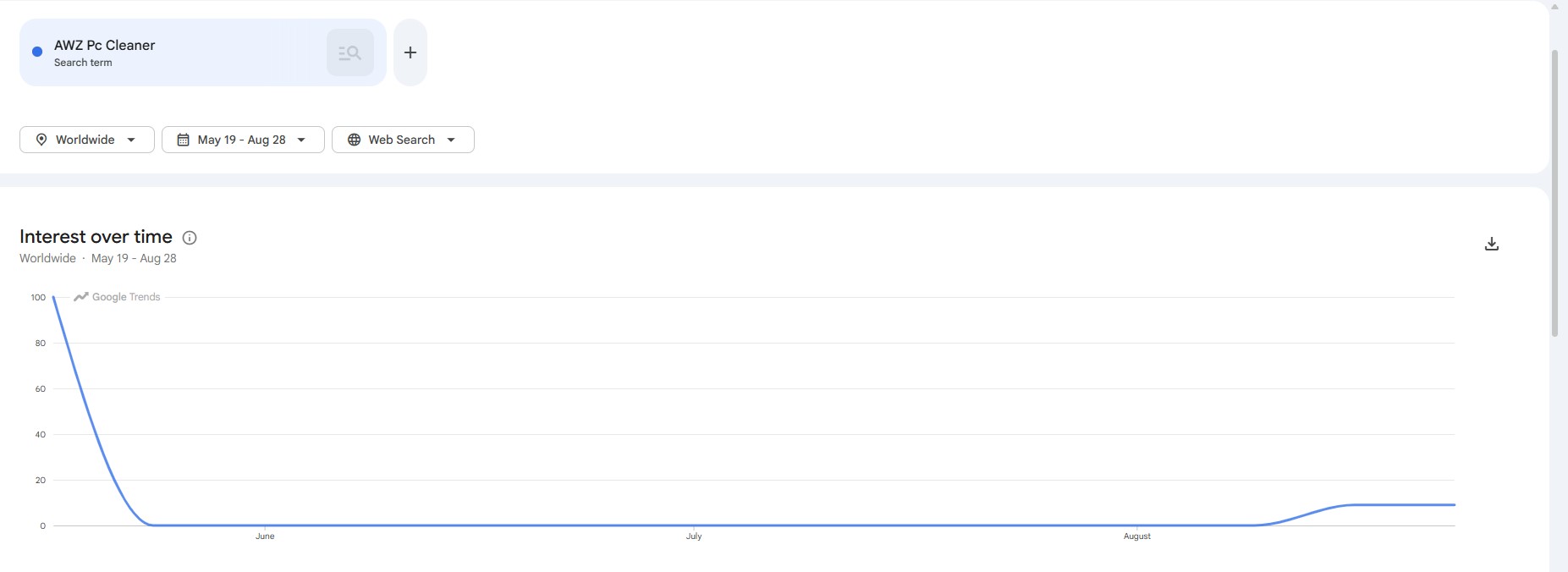
I first looked at AWZ alone and the launch produced its strongest showing, with the Trends index starting at 100.
Interest then dropped sharply and spent most of June, July, and early August close to the floor.
There is a small but noticeable pickup toward the end of August, reaching roughly 9 on the standalone chart. I wouldn’t read too much into that yet, but it is at least more encouraging than a completely flat line.
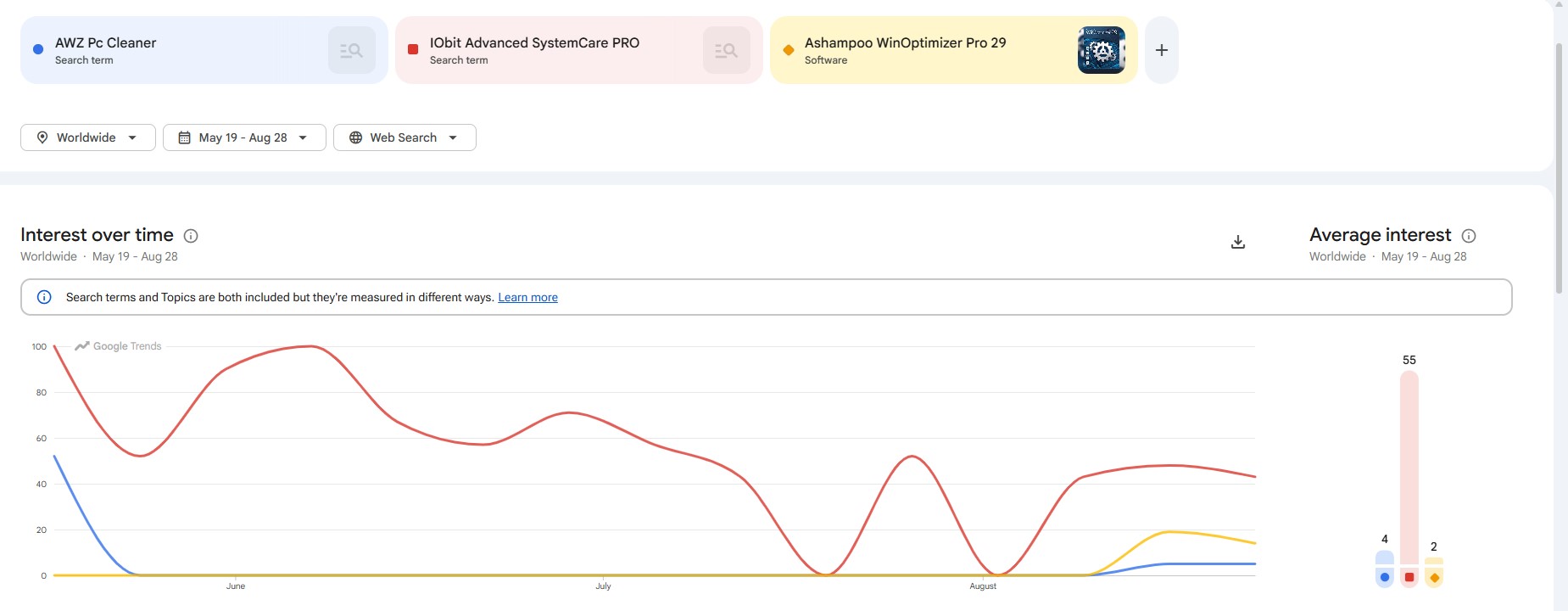
Put the three products on the same chart, though, and AWZ’s position becomes clearer. IObit Advanced SystemCare PRO dominates the comparison. IObit’s line moves around considerably and even touches zero twice, but it repeatedly rebounds into the 40–50 range and reaches the overall peak of 100. AWZ, by comparison, gets most of its average from the initial launch period and barely registers afterward until its modest late-August return.
There is a fairly straightforward explanation for IObit’s advantage. It has been around since 2005. AWZ PC Cleaner entered this market only months ago. Expecting the two names to generate comparable search interest this soon would be unrealistic.
On the other hand, Ashampoo WinOptimizer Pro 29 edition was released on May 12, just a week before AWZ PC Cleaner, but WinOptimizer itself belongs to an established product line.
I think visibility is the bigger problem for AWZ PC than the features it offers. It has entered a crowded category where familiar names have had years to work their way into search results, software directories, reviews, recommendation threads, and users’ memories. AWZ still has to build that footprint.
That leads naturally to the more useful question. While AWZ is not winning Google Trends as on date, does it bring a more expansive set of features compared to its established competitors or it sticks to the basics? Let’s find out.
Features comparison with competitors
AWZ PC Cleaner vs. Advanced SystemCare PRO vs. Ashampoo WinOptimizer Pro 29
| Feature | AWZ PC Cleaner | IObit Advanced SystemCare PRO 19 | Ashampoo WinOptimizer Pro 29 |
| Junk/deep cleaning | | including AI-powered deep cleaning | with multiple dedicated cleaners |
| Registry cleanup | | | Registry Optimizer |
| Startup optimization | | | Startup Manager |
| Automatic maintenance | | | |
| One-click optimization | | | One Click Optimizer |
| Duplicate file finder | | | |
| Large-file/storage tools | including Large File Mover and Files Mover | | including DiskSpace Explorer |
| Disk defragmentation | | | |
| RAM/memory optimization | No dedicated tool | automatic Memory Release | broader system-resource optimization |
| Privacy cleanup/protection | Limited | including Anti-Tracking and Identity Masking | including Privacy Traces Cleaner and Privacy Manager |
| Ransomware protection | | Safe Folder | No dedicated ransomware protection |
| Software updater | | | |
| Crash/system-error analysis | No dedicated tool | | Yes, Crash Analyzer |
| Windows customization | Limited | | Extensive, including Tuning Assistant and Tweaking tools |
| Works in the background? | | | |
| App uninstaller | | | |
Conclusion
Should You Buy It?
AWZ PC Cleaner earns its place as a new arrival in the PC cleanup market. It keeps everyday maintenance approachable while still packing in useful tools for junk removal, duplicate files, startup optimization, storage management, defragmentation, and stubborn app removal. The $39.99 perpetual license for two PCs makes the package easier to recommend, especially if you’d rather pay once than keep another subscription running.
However, there are more feature-rich alternatives that have bigger footprints for obvious reasons. IObit Advanced SystemCare PRO 19 is great for automated maintenance, privacy protection, and additional security features. If you are looking for deeper diagnostics and system management tools, go for Ashampoo WinOptimizer Pro 29.
In my opinion, AWZ doesn’t need to outdo either one at everything. For straightforward Windows cleanup and optimization without a pile of extras to figure out, it’s money well spent. I strongly recommend it for everyday PC cleanup tasks.